
Wednesday, April 20, 2016

Saturday, April 25, 2015
Delete Duplicate Rows in Sql Server
Please find Original post from here
In this article, i would like to share a tip for deleting duplicate rows from sql server table.
For that we will be using a student table created from following query
CREATE TABLE tbl_Student
(
rollNumber INT,
studentName VARCHAR(MAX),
address VARCHAR(MAX)
)
 |
| tbl_Student |
following query will be helpful to know is there any duplicate rows based on rollNumber,
SELECT DISTINCT rollnumber,COUNT(*) AS [Number of Duplcates]
FROM tbl_Student
GROUP BY rollNumber
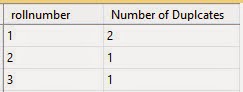
and shows that rollNumber with '1' is repeated twice
Now i am going to delete this duplicate rows and this can be done in two method using CTE
Please find Original post from here
Method 1 - by keeping original
In this method all duplicate rows will be deleted by preserving original copy and my query looks like this
WITH CTE AS
(
SELECT *,ROW_NUMBER() OVER (PARTITION BY rollNumber ORDER BY rollNumber) AS RN
FROM tbl_Student
)

DELETE FROM CTE WHERE RN<>1
 |
| after deletion |
Please find Original post from here
Method 2 - without keeping original
Here we will delete all repeated rows including original copy and here is the query
WITH CTE AS
(SELECT *,R=RANK() OVER (ORDER BY rollNumber)
FROM tbl_Student)

DELETE CTE
WHERE R IN (SELECT R FROM CTE GROUP BY R HAVING COUNT(*)>1)
 |
| after deletion |
-- Done Folks--
»Keep Sharing and Learning ☺ «
Video Tutorial
Video Tutorial
Wednesday, April 8, 2015
&& and || - C# Short Circuited Logical Operators
Please find original post from here
Table of Contents
- Introduction
- What is Short Circuiting in C#?
- && Vs & or || Vs |
- How to Use && in C#
- Side Effect
- Conclusion
Introduction
Hi everyone, in this article we'll discuss C# short circuited logical operators && and || in depth. Most of us must have used these && and || operators but many of them don't think about why we use && not & instead.Use of these operators is one of the best practice in c# over non short circuited operators & and |. So you should know how it works, where to use them and how they increase speed of execution. let's get started.
NOTE : all of the code snippet given in this are well tested.
What is Short Circuiting in C#?
Short circuiting is a tricky method of evaluating logical operators AND and OR. In this method, whole expression can be evaluated to true or false without evaluating the every expressions in some cases.
Consider following c# code snippet using & and |
bool Condition1() { return false; }
bool Condition2() { return true; }

public A()
{
    if (Condition1() & Condition2())
    {
        //inside code will not execute
    }

    if (Condition2() | Condition1())
    {
        //inside code will execute
    }
}
While debugging it looks like below |
| Debugging Of Non Short Circuited Operators In C# |
In the above program both operands Condition1() and Condition2() are evaluated.
You can see skipping of evaluations due to short circuiting.Short circuited version of logical operators are efficient and faster.
Consider following example
For AND operations if any of the operand evaluated to false then total expression evaluated to false then there is no need to evaluate remaining expressions or operands, And that of OR operation if any of the operand evaluated to true then remaining evaluation can be skipped.This type of skipping is done through short circuited evaluation.For that, in the above program, & is replaced with && and | is replaced with ||, then debugging will be like this
 |
| Debugging Of Short Circuited Operators In C# |
You can see skipping of evaluations due to short circuiting.Short circuited version of logical operators are efficient and faster.
Consider following example
if (false && Condition1())
{
    //inside code will execute in any case
}
in the above if clause, Condition1() will not be evaluated because whatever be the value of Condition1() whole expression will be false.If we use & instead of && Condition1() get evaluated which can be expensive in some cases.So always try to stick with short circuited version, There is one little point you should aware of, when you use short circuited logical operators that is Side effect.I will tell you what it means in later parts of this article.&& Vs & or || Vs |
Please find original post from here
We have discussed that short circuiting, count it as the first difference between them. Before getting into remaining differences let's grab some basics that might be helpful to understand the rest.
AND, OR operators can be found in the following ways :-& ( single ampersand ) - Logical AND operator
| ( single pipeline) - Logical OR operator
Both of these operators are non short circuited in nature.
&& ( double ampersand ) - Conditional AND operator
|| ( double pipeline) - Conditional OR operator
Both of these are short circuited logical operators and collectively knows as Conditional Logical Operators.
Order of Evaluation ::
Order of execution of any of these operators are from left to right.In the following lines of code
if(Expression1() && Expression2() && ....)
{ }
Expression1 will be evaluated first then Expression2 and so on.
Remaining Differences
- & and | can have both Boolean operands as well as Numeric operands for Bit-wise operation But && and || operands can only be applied to Boolean operands.
- & operator can be used as either unary or binary operator. ie, unary & can be used to get address of it's operand in unsafe context.
How to Use && in C#
In this section i will tell you how to use && with the help of some practical examples.In the same way you can understand how you can make use of || operator.
1.Preventing Exceptions
If you asked to write a c# program for checking 5th element in a given array is odd or not.It is better to implement following if clause.
if (array.Count() >= 5 && array[4] % 2 == 1)
{
    //print message here
}
If the && were replaced with &.it will cause Index was outside the bounds of the array exception when array does not contains 5 elements.2.Ordering Expressions to Reduce Performance Impact
I already mentioned that order of evaluation is from left to right in these operators.So if you have a series of operands for && operator as below and each of them are independent of each other.
if (Validations() && CheckUserExistance() && ..... && IsAuthorised())
{
    //Some Operations
}
It is better to arrange them in the order of their complexity.For example, if you are dealing with a project including lot of data base interactions, move all those DB methods to right side of if clause so that in many of the instances these methods won't be executed if preceding operands were false.
Side Effect
Consider the following example
int i = 0;
            if (true && (++i < 50))
            {
                //code goes here
            }
            //value of i is 1
            if (false && (++i < 50))
            {
                //inside code will not execute
            }
            // value of i remains as 1
As a result of short circuiting second operand in second if clause will not execute, so value of i remains same as before.this effect is called Side effect, I would say it is a Right Side effect right?☺
So when you use them you should aware of this effect and these effects are practically seen in rare situations.
Conclusion
Short circuited logical operators in C# are && and ||, They are efficient and fast version of logical operators in C#.So it is a good practice to use them and there is no reason no to use them.side effect is a byproduct of short circuiting but it is rare.
♥ I have put my valuable time and effort in making the article informative so please leave your comments below ♥
-- Done.Thanks For Reading --
»Keep Sharing and Learning ☺ «
Wednesday, February 11, 2015
Difference Between String And StringBuilder In C#
Please Find Original Post From here
Introduction
It is one of the frequently asked question in all interviews and all of us answer something in commonString is Immutable and StringBuilder is MutableThis is a one word answer. In this article I would like to dig things in more details
Please Find Original Post From here
Don't Ignore Basics
Both String and Stringbuilder represent sequence of characters. When we list out their differences some of us don't remember basic difference. That is String Class is in the System Namespace While StringBuilder is in System.Text.
Some Times Mute Is Safe ☺
Let us make the statement again "String is Immutable and StringBuilder is Mutable" [Don't be Confused about which one is mutable and which one is not].
Immutability of string object Means, If any of your operation on the string instance changes it's value, it will end up in the creation of new instance in a different address location with modified value. Mutability of StringBuilder is just opposite for this.It won't create new instance when their content changes as string does.Instead it makes the new changes in the same instance.
Mutability and Immutability of these two can be understood from following C# Program.
using System;
using System.Text;

namespace StringVsStringBuilder
{
    class Program
    {
        static void Main(string[] args)
        {
            String str = "My first string was ";
            str += "Hello World";
            //Now str="My first string was Hello World"
            StringBuilder sbr = new StringBuilder("My Favourite Programming Font is ");
            sbr.Append("Inconsolata");
            //Now sbr="My Favourite Programming Font is Inconsolata"
            Console.ReadKey();
        }
    }
}
in line 11 content of str changes, so new instance is created and new value is stored in it as shown below

even though line 14 changes the value stringbuilder sbr it won't create a new instead it will keep appending new strings to existing instance.see how it looks in terms of memory

Because of this behaviour of StringBuilder it also known as Mutable String.
Please Find Original Post From here
{}I'm not convinced
If you say I'm not convinced.let us check these behaviours using C# code snippet.For that i am using a C# class ObjectIDGenerator(in System.Runtime.Serialization Namespace).Actually it will return an unique integer value for instances that we created in our programs.With the help of this class we can check whether new instance is created or not for various operations on string and stringbuilder .Consider following program
using System;
using System.Text;
using System.Runtime.Serialization;

namespace StringVsStringBuilder
{
    class Program
    {
        static void Main(string[] args)
        {
            ObjectIDGenerator idGenerator = new ObjectIDGenerator();
            bool blStatus=new bool();
            //just ignore this blStatus Now.
            String str = "My first string was ";
            Console.WriteLine("str = {0}",str);
            Console.WriteLine("Instance Id : {0}",idGenerator.GetId(str,out blStatus));
            //here blStatus get True for new instace otherwise it will be false
            Console.WriteLine("this instance is new : {0}\n",blStatus);
            str += "Hello World";
            Console.WriteLine("str = {0}", str);
            Console.WriteLine("Instance Id : {0}", idGenerator.GetId(str, out blStatus));
            Console.WriteLine("this instance is new : {0}\n", blStatus);
            //Now str="My first string was Hello World"
            StringBuilder sbr = new StringBuilder("My Favourate Programming Font is ");
            Console.WriteLine("sbr = {0}", sbr);
            Console.WriteLine("Instance Id : {0}", idGenerator.GetId(sbr, out blStatus));
            Console.WriteLine("this instance is new : {0}\n", blStatus);
            sbr.Append("Inconsolata");
            Console.WriteLine("sbr = {0}", sbr);
            Console.WriteLine("Instance Id : {0}", idGenerator.GetId(sbr, out blStatus));
            Console.WriteLine("this instance is new : {0}\n", blStatus);
            //Now sbr="My Favourate Programming Font is Inconsolata"
            Console.ReadKey();
        }
    }
}
Output Will look like this

Did you see that..?, Instance id for string get changed from 1 to 2 when str concatenated with "Hello World".while instance id of sbr remains same as 3 after append operation also. This tells all about mutability and immutability.blStatus in my program tells whether the instance is new or not. Now you are convinced right?
Who Run Faster?
Let's discuss performance difference between string and stringbuilder.The following code box will explain things simply.Before that if you don't how to measure execution time in C# please read my article from here .
using System;
using System.Text;
using System.Diagnostics;

namespace StringVsStringBuilder
{
    class Program
    {
        static void Main(string[] args)
        {
            Stopwatch Mytimer = new Stopwatch();
            string str = string.Empty;
            Mytimer.Start();
            for (int i = 0; i < 10000; i++)
            {
                str += i.ToString();
            }
            Mytimer.Stop();
            Console.WriteLine("Time taken by string : {0}",Mytimer.Elapsed);
            StringBuilder sbr = new StringBuilder(string.Empty);
            //restart timer from zero
            Mytimer.Restart();
            for (int i = 0; i < 10000; i++)
            {
                sbr.Append(i.ToString());
            }
            Mytimer.Stop();
            Console.WriteLine("Time taken by stringbuilder : {0}", Mytimer.Elapsed);
            Console.ReadKey();
        }
    }
}
Output of this program was 
One Last Thing
New Instance of string will be created only when it's value changesOne more thing,If you do an operation on a string variable, Creation of new instance occurs only when it's current value changes.try following code
using System;
using System.Text;
using System.Runtime.Serialization;

namespace StringVsStringBuilder
{
    class Program
    {
        static void Main(string[] args)
        {
            ObjectIDGenerator idGenerator = new ObjectIDGenerator();
            bool blStatus = new bool();
            string str = "Fashion Fades,Style Remains Same";
            Console.WriteLine("initial state");
            Console.WriteLine("str = {0}",str);
            Console.WriteLine("instance id : {0}",idGenerator.GetId(str,out blStatus));
            Console.WriteLine("this is new instance : {0}",blStatus);
            //a series of operations that won't change value of str
            str += "";
            //try to replace character 'x' which is not present in str so no change
            str = str.Replace('x','Q');
            //trim removes whitespaces from both ends so no change
            str = str.Trim();
            str = str.Trim();
            Console.WriteLine("\nfinal state");
            Console.WriteLine("str = {0}", str);
            Console.WriteLine("instance id : {0}", idGenerator.GetId(str, out blStatus));
            Console.WriteLine("this is new instance : {0}", blStatus);
            Console.ReadKey();
        }
    }
}
Output!

initial and final id is 1-means new instance is not created for these operation since it does not change the value of str.You may wonder about how compiler shows this intelligence.☻
Shoot Your Doubts
»Why .NET String is immutable? AnsPlease Find Original Post From here
---Done Folks.Happy Coding --
»Keep Sharing and Learning«
video tutorial
video tutorial
Friday, February 6, 2015
Difference Between declarations int i and int i=new int() in C#
In this post i would like to share the difference between following declarations in C#
declaration 1:
After the declaration 1, if you would like to do any operation on i as follows or any other operation before it get initialised.
But in declaration 2,variable i is initialised by creating an instance of class Int32[ie new int()].so it will get a default value of int(ie 0) from constructor of Class Int32.So you don't need to initialise the variable to any other unless it is necessary before doing any operation on the variable i.
Default value of Boolean is False and that of character is '\0'.To see default values of all data types in C# click here [from msdn].
declaration 1:
int i;declaration 2:
int i=new int();
In both of these declarations i is declared as a variable of type integer without any problem,
but there are some differences.
After the declaration 1, if you would like to do any operation on i as follows or any other operation before it get initialised.
i=i*i;you will get compiler error as follows
use of unassigned local variable'i'you need to initialise the integer variable before doing any further operation on the variable after this declaration.
But in declaration 2,variable i is initialised by creating an instance of class Int32[ie new int()].so it will get a default value of int(ie 0) from constructor of Class Int32.So you don't need to initialise the variable to any other unless it is necessary before doing any operation on the variable i.
Default value of Boolean is False and that of character is '\0'.To see default values of all data types in C# click here [from msdn].
Done ;)
»Keep Sharing and Learning«
video tutorial
video tutorial
Saturday, January 17, 2015
Delete Duplicate Rows from DataTable in C#
You have a Data Table-dt
To remove duplicate records from dt.
for (int i = 0; i < dt.Rows.Count-1; i++)
{
  for (int j = i+1; j < dt.Rows.Count; j++)
  {
    if (dt.Rows[i].ItemArray.SequenceEqual(dt.Rows[j].ItemArray))
      dt.Rows[j].Delete();
  }
}
»Keep Sharing and Learning«
Tuesday, January 6, 2015
Difference between String and string
Let's Discuss difference between
above program will run without any error but doesn't have any output.
program will run perfectly,So we may Conclude that
As always keywords always make the things more Simple.That means you can use variables of type string without using System namespace.
String and string in c#
in one word :-
String is a class in dotnet class library
string is a keyword
illustration ::
Here we go,consider the following program
//program1
//program for just declaring a string variable
using System;
class Program
{
static void Main(string[] args)
  {
  String str = "string vs String";
  }
}
above program will run without any error but doesn't have any output.
Now i remove the namespace System from the program,the code will looks like
if i try to run the program it will shows following error message
 from the above two program we understood that
//program2
//program for just declaring a string variable
class Program
{
static void Main(string[] args)
  {
  String str = "string vs String";
  }
}
if i try to run the program it will shows following error message
- String is class inside System Namespace
- Since You must import System to use String
//program3
//program for just declaring a string variable
class Program
{
static void Main(string[] args)
{
string str = "string vs String";
}
}
program will run perfectly,So we may Conclude that
string keyword = System.String class
As always keywords always make the things more Simple.That means you can use variables of type string without using System namespace.
Done
»Keep Sharing and Learning«
video tutorial
video tutorial
Saturday, January 3, 2015
How to measure program execution time in C#
Please find original post from here
Tip showing how to measure time taken by a C# program using the class Stopwatch.Stopwatch class provides a set of methods and properties that you can use to accurately measure elapsed time-by msdn
using System;
//don't forget to use namespace System.Diagnostics
using System.Diagnostics;

namespace ConsoleApplication1
{
    class Program
    {
        static void Main(string[] args)
        {
            //creating object of Stopwatch
            Stopwatch myTimer = new Stopwatch();
            //strats timer
            myTimer.Start();
            //your program goes here
            //loop to add numbers between 0 and 10000
            int x = 0;
            for (int i = 0; i < 10000; i++)
            {
                x += i;
            }
            //stop timer after specific code under evaluation
            myTimer.Stop();
            //print time elapsed by the code in between Start() and Stop() methods.
            Console.WriteLine("time elapsed :" + myTimer.Elapsed);
            Console.ReadKey();
        }
    }
}
output for above code snippet was:- Please find original post from here

-- Done --
»Keep Sharing and Learning«
video tutorial
video tutorial
Tuesday, December 23, 2014
Different Ways To Insert Records Into A Table In Sql Server
1.Simple
Syntax :-
INSERT INTO table_name
VALUES
(value_1,value_2,....,value_n)
* Here number of values supplied (that is n) must be equal to number of columns in the table
2.Insert into specific column
Syntax :-
INSERT INTO table_name(column_1,column_2,....,column_m)
VALUES
(value_1,value_2,....,value_m)
* Here number of values supplied (that is m) must be equal to number of specified columns in the table
Remarks:-
- Unspecified column will be assigned with default value(if specified) or NULL .
- Here the Specified column must include column with primary key constraint(if defined).
3.Insert Multiple Rows In Single Query
- Unspecified column will be assigned with default value(if specified) or NULL .
- Here the Specified column must include column with primary key constraint(if defined).
3.Insert Multiple Rows In Single Query
Syntax :-
INSERT INTO table_name
[(column_1,column_2,....,column_m)] --specify columns
VALUES
(value_1,value_2,....,value_n), --row_1
(value_1,value_2,....,value_n), --row_2
.
.
.
.
.
(value_1,value_2,....,value_n), --row_m
*Here m rows will be inserted into the specified table
Done
»Keep Sharing and Learning«
Thursday, December 4, 2014
An Interview Question For C# Programmers
Q: Consider following code snippet
int i=5;
i=i++;
Please find original post from here
after these two lines what will be the value of i ?
Ans: 5
illustration: -
Please find original post from here
Most of us answer 6 but it's not the case, Value of i remains unchanged (i remains as 5). But somewhere along the execution, value of i was 6 but it is assigned with value 5 finally.
Consider the following program
class Program
{
    static int i;
    static void Main(string[] args)
    {
        i = 5;
        i = postIncrement();
    }
    static int postIncrement()
    {
        return i++;
    }
}
separate function for post Increment is written for better understanding of problem.Now While debugging the program in visual studio it will look like this |
| Debugging of the problem in VS 2012 |
Steps Involved:-
1. i initialised to 5.

2. i++ operator returns 5 but not assigned to i.
3. i++ operator increments value of i to 6.

4. i is assigned with 5 which is the value returned by i++ in step 2.

try to solve related questions like
after thes two lines what will be the value of i? Comment you answer please.
◙ Done.Happy Coding ☺ ◙
»Keep Sharing and Learning«
Subscribe to:
Posts (Atom)